
Quick Answer
A surface roughness chart is a reference table that maps roughness parameters—Ra, Rz, RMS—to ISO grade numbers and typical manufacturing processes, so you can specify the right surface finish without guesswork. Three answers cover most situations:
- Ra is the most common parameter. It’s the arithmetic average roughness and appears on the majority of engineering drawings.
- Lower Ra means smoother—and usually more expensive. A tighter finish often needs extra grinding, honing, or polishing. Smoother is not automatically better.
- Ra 1.6 µm (63 µin) is the sensible default for most CNC-machined parts. Standard milling and turning hit it without special operations.
| Ra (µm) | Description | Typical Use |
|---|---|---|
| 3.2 | Standard machined finish | Structural and non-mating faces |
| 1.6 | Good general finish (common default) | Standard mating parts |
| 0.8 | Fine finish | Seals, sliding surfaces |
Use the rest of this guide to convert between units, check what each process can realistically achieve, read drawing symbols correctly, and choose the right Ra value with confidence.
Introduction
Run a fingernail across a freshly milled surface, and you’ll feel it—even when the part looks smooth. That texture is surface roughness, and it drives more decisions in manufacturing than most people realize. Specify a finish tighter than the part needs, and you silently inflate the cost of every unit. Spec one that’s too rough and you risk leaks, premature wear, or a coating that won’t grip. The real question isn’t “what does Ra mean?” It’s “what Ra should I actually put on this surface?”
A good surface roughness chart answers both, but only if it also tells you how to use the numbers. This guide is built to do exactly that. You’ll find a complete surface roughness conversion chart spanning Ra 0.025 to 50 µm, a process capability table showing what milling, turning, grinding, and other methods can reliably hit, and an application guide that maps real functions to sensible Ra ranges. We’ll explain Ra vs Rz vs RMS in plain terms, walk through how to read a drawing callout and its symbols, and give you a repeatable three-step process for choosing the right value. Bookmark it, and you’ll spend less time second-guessing and more time specifying correctly.
Let’s start with the three parameters you’ll see on almost every drawing.
Ra, Rz, and RMS Explained Simply
Surface roughness parameters can feel like alphabet soup—Ra, Rz, Rq, Rsk, Rku, and more. In practice, three of them cover almost everything you’ll encounter. Understand these, and any surface finish chart becomes much easier to use.
What Is Ra (Arithmetic Average Roughness)?
Ra is the arithmetic average roughness. Picture the surface profile as a wavy line of peaks and valleys. Draw a mean line through the middle, then measure how far the profile strays above or below it at each point. Ra is the average of all those deviations.
That averaging is exactly why Ra is the industry workhorse. It gives one stable, repeatable number that summarizes the whole surface and is straightforward to measure. One deep scratch won’t dramatically throw off the reading, making it reliable for general quality control. When a drawing calls out a finish without specifying which parameter, it almost always means Ra.
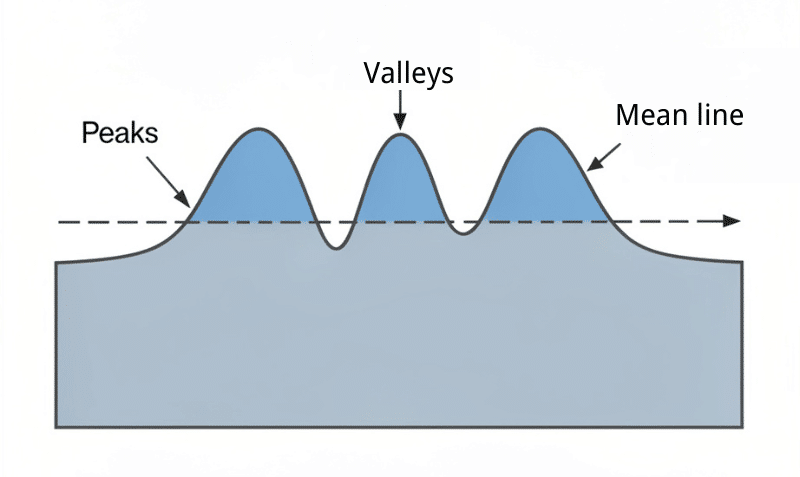
The trade-off is that averaging hides extremes. A surface with a single deep gouge and an otherwise smooth profile can report the same Ra as a uniformly textured surface. Ra describes the general lay of the land, not whether a problem is hiding in a valley. For sealing and sliding surfaces, where one deep groove can cause a leak or accelerate wear, that limitation matters.
What Is Rz (Average Maximum Height)?
Rz measures the average maximum height of the roughness profile. Instead of averaging every point, it divides the trace into several segments of equal length, finds the largest peak-to-valley distance in each segment, and averages those maximum values.
Because it focuses on the tallest peaks and deepest valleys, Rz catches extremes that Ra smooths over. A surface with an occasional deep scratch will show a noticeably higher Rz even when its Ra looks acceptable. That sensitivity makes Rz the better parameter for sealing faces, fatigue-critical parts, or any surface where a single defect—a burr, a deep groove, a scratch from handling—could cause a failure.
Note that Rz values are always numerically larger than Ra for the same surface. Never compare the two directly without converting.
What Is RMS (Root Mean Square)?
RMS roughness is a close relative of Ra. Instead of averaging the absolute values of the deviations, RMS squares each deviation, averages the squared values, then takes the square root. Squaring amplifies larger deviations, so RMS is slightly more sensitive to prominent peaks and valleys than Ra—typically about 11% higher for the same surface.
You’ll encounter RMS primarily on older drawings and in imperial (microinch) specifications, particularly those referencing legacy US standards. Modern practice favors Ra, but RMS still appears regularly enough that it’s worth knowing how to recognize and convert it.
Ra vs Rz vs RMS – When to Use Which
| Parameter | Definition | Sensitive To | When to Use |
|---|---|---|---|
| Ra | Average deviation from the mean line | Overall texture | Default for most drawings |
| Rz | Average of max peak-to-valley heights | Extreme peaks and valleys | Seals, fatigue, defect-critical parts |
| RMS | Root mean square of deviations | Larger peaks and valleys | Older or US imperial drawings |
Is Ra or Rz better? Neither is universally superior—they answer different questions. Ra describes overall texture; Rz flags the worst spots. For most machined parts, Ra alone is sufficient. When a single scratch or valley could cause a failure, add an Rz limit alongside the Ra callout so the extremes can’t slip through inspection.
Master Surface Roughness Conversion Chart
This is the table most engineers come here for. It maps Ra in micrometers and microinches to RMS, the ISO N grade, a typical process used to produce each finish, and a common use case. Read across any row to translate one value into all the others.
Use it to convert between units, verify a supplier’s callout against your drawing, or identify which process naturally lands on the finish you need.
| Ra (µm) | Ra (µin) | RMS (µin) | ISO N Grade | Typical Process | Common Use |
|---|---|---|---|---|---|
| 0.025 | 1 | 1.1 | N1 | Superfinishing / Lapping | Gauge blocks, precision instruments |
| 0.05 | 2 | 2.2 | N2 | Lapping | High-precision gauges |
| 0.1 | 4 | 4.4 | N3 | Honing / Fine grinding | Precision sliding surfaces |
| 0.2 | 8 | 8.8 | N4 | Honing / Fine grinding | Sealing and bearing surfaces |
| 0.4 | 16 | 17.6 | N5 | Precision grinding | High-pressure seals, fine fits |
| 0.8 | 32 | 32.5 | N6 | Fine turning / Grinding | Mating faces, sliding contacts |
| 1.6 | 63 | 64.3 | N7 | CNC milling / Turning | Standard mating parts (default) |
| 3.2 | 125 | 137.5 | N8 | General milling / Turning | General machine and structural faces |
| 6.3 | 250 | 275 | N9 | Rough machining | Clearance and non-contact faces |
| 12.5 | 500 | 550 | N10 | Rough machining / Casting | As-cast or rough-cut surfaces |
| 25 | 1000 | 1100 | N11 | Sawing / Rough forging | Unmachined stock, blank faces |
| 50 | 2000 | 2200 | N12 | Sawing / Rough forging | Rough clearance areas |
These conversions are standard approximations. The RMS-to-Ra relationship and ISO grade boundaries vary slightly with surface pattern and measurement conditions. When exact equivalence matters, defer to the specific standard referenced on your drawing.
Process Capability Chart — What Each Process Can Achieve
Every machining process has a natural range of finishes. Push a process below its comfort zone, and you either fight the machine or add a secondary operation—both of which cost more. The table below shows what each method can reliably and economically achieve in normal production, not the absolute limit a specialist shop might reach under ideal conditions.
The practical rule: if your target Ra sits below a process’s economic default, you’re committing to extra steps and extra cost. Make sure the function justifies the callout before locking it.
| Process | Typical Ra Range (µm) | Economic Default (µm) | Notes |
|---|---|---|---|
| CNC Milling | 0.8–6.3 | 1.6–3.2 | Standard for general faces and pockets |
| CNC Turning | 0.4–6.3 | 1.6–3.2 | Fine turning reaches the lower end |
| Grinding | 0.1–1.6 | 0.4–0.8 | First choice for precise mating surfaces |
| Honing | 0.05–0.4 | 0.1–0.2 | Bores, cylinders, hydraulic surfaces |
| Lapping | 0.012–0.1 | 0.025–0.05 | Ultra-precise flats and gauges |
| Wire / Sinker EDM | 0.4–3.2 | 0.8–1.6 | Complex cavities and hard materials |
| Casting (die / sand) | 3.2–25 | 6.3–12.5 | As-cast; varies widely by method |
| 3D Printing (metal/plastic) | 6.3–25 | Depends on post-processing | Visible layer lines usually need finishing |
A few practical notes worth keeping in mind:
- Milling and turning are your default workhorses. Spec Ra 1.6–3.2 µm, and you’ll get it without special tooling or extra setups.
- Feed rate is the biggest lever inside any process. Slow the feed, and the finish improves; push the feed, and you’ll see the marks. If a turned part is coming out rougher than expected, the feed rate is the first thing to check.
- Material behavior matters too. Soft, gummy metals, such as some aluminum alloys, smear and build up on the cutting edge, leaving a dragged, uneven surface, even with good parameters. Hardened steels behave the opposite way—they’re harder to cut, but they hold a fine finish cleanly once you’re grinding them.
- Grinding and honing come into play when a functional surface needs a controlled, fine finish that milling or turning can’t reliably achieve.
- Lapping is reserved for the tightest requirements—gauge surfaces, ultra-flat sealing faces—and comes with real cost and lead time.
- Casting and 3D printing produce rough as-made surfaces. If you need anything smooth, plan for machining or post-processing from the start.
Best Surface Finish by Application
Sometimes the easiest path is to start from what the surface has to do, then work back to a number. Here are practical starting ranges for the most common functional surfaces.
Sealing Surfaces
Sealing faces typically call for Ra 0.4–0.8 µm. Too rough and the seal leaks through microscopic channels between the surface and the sealing element. Too smooth and you may lose the slight texture that helps some seals seat and retain lubricant, while paying more for a finish that offers no benefit. For static high-pressure seals, lean toward the lower end and consider adding an Rz limit to catch the isolated deep scratches that Ra can miss.
Bearing and Sliding Surfaces
Bearing and sliding contacts usually target Ra 0.2–0.8 µm. A controlled finish reduces friction and wear while preserving the thin lubricating oil film that prevents metal-to-metal contact. Going too smooth can actually starve the oil film in some lubrication regimes—so match the finish to the lubrication design rather than defaulting to “as smooth as possible.”
Cosmetic / Visible Surfaces
For visible surfaces, appearance and downstream treatment drive the requirement. A part headed for polishing, bright anodizing, or a mirror finish needs a finer starting texture; a bead-blasted or brushed finish tolerates a rougher base. Define cosmetic surfaces by the intended final look, not by a functional Ra you don’t actually need.
Coating and Paint Prep Surfaces
Here’s the counterintuitive case: surfaces prepared for paint or powder coating often need some roughness, not a smooth finish. A moderate texture gives the coating mechanical grip—what the industry calls “tooth.” Over-polishing before coating can reduce adhesion and lead to peeling. Follow the coating supplier’s recommended surface profile rather than assuming smoother is always better.
General Machined / Non-Contact Surfaces
For faces that don’t seal, slide, locate, or show, Ra 3.2 µm is almost always enough. Structural brackets, backing faces, and non-mating surfaces don’t depend on texture to do their job. Specifying anything tighter here is the single most common way to add cost without adding value.
0.2–0.8
How to Choose the Right Ra Value
The fastest path to a defensible callout is a short, repeatable process. Work through these three steps before writing any roughness value on a drawing.
Step 1 – Start From Function, Not a Number
Before you write anything, ask what the surface actually does. Does it seal? Slide against another surface? Locate a mating part? Accept a coating? Or is it simply structural or cosmetic? The function—not habit, not a “safe” round number copied from an old drawing—should drive everything that follows.
Step 2 – Match Function to an Ra Range
Translate that function into a starting range using the application guidance above:
- Sealing → Ra 0.4–0.8 µm
- Bearing/sliding → Ra 0.2–0.8 µm
- Coating prep → moderate and textured
- General/non-contact → Ra 3.2 µm
Choose a range at this stage, not a single precise value. You’ll narrow it once you’ve confirmed the process.
Step 3 – Confirm the Process Can Hit It Economically
Cross-check your target against the process capability chart. If the process you plan to use reaches that range within its economic default, you’re done—write the value and move on. If the range falls below the process default, you’re committing to a secondary operation such as grinding, honing, or lapping, along with the added setup time, cost, and inspection that comes with it. Decide whether the function genuinely justifies that expense before the callout gets locked in.
Ra Value Quick Guide
| Ra Value | Choose It For | Cost Impact |
|---|---|---|
| Ra 3.2 µm | General machined faces, structural parts, non-mating surfaces | Lowest |
| Ra 1.6 µm | Standard mating parts (sensible default for most CNC work) | Low |
| Ra 0.8 µm | Seals, sliding contacts, higher-precision assembly | Moderate |
| Ra 0.4 µm and below | Demanding functional surfaces | High and rising steeply |
Practical takeaway: specify by function, default to Ra 1.6 µm when in doubt, and only go finer where the part genuinely needs it. Every step down the Ra scale is a spending decision.
Surface Roughness Symbols and Drawing Callouts
Reading a surface roughness symbol correctly is one of the more underappreciated skills in manufacturing. The symbol is compact, but every element has a specific meaning—misread one and you can end up with a part that’s needlessly machined or incorrectly left rough.
The Basic Surface Texture Symbol
The core symbol looks like a checkmark or tick mark with a longer arm on the right. On its own, it means “surface texture is required” without specifying how. The detail is added around it:
- Above the long arm: the roughness value, such as Ra 1.6.
- To the left / on the surface indication: the required production method or process, when specified.
- Below or to the right: lay direction, sampling (cut-off) length, or a second parameter such as Rz when needed.
Reading the symbol is simply a matter of knowing which position carries which piece of information.
Machining Required vs Material Removal Prohibited
Two common variants carry very different manufacturing instructions:
- Machining required: the basic tick with a small horizontal bar across the top of the longer arm. It tells the manufacturer that material must be removed—by milling, turning, grinding, or another cutting method—to achieve the specified surface.
- Material removal prohibited: the basic tick with a small circle in the vee of the symbol. It means the surface must be left exactly as produced (as-cast, as-forged, as-molded), with no machining allowed.
Confusing these two leads to parts that are either machined when they shouldn’t be or left rough when a functional finish was required. Read the modifier before writing—or quoting—the callout.
How to Read a Callout (Example: Ra 0.8)
Take a callout reading Ra 0.8 above a machining-required symbol pointing at a surface. Decoded:
- The symbol with the horizontal bar indicates that material removal is required.
- Ra identifies the parameter—arithmetic average roughness.
- 0.8 is the maximum allowable value, in micrometers.
- Any note to the left specifies a required process; anything below adds lay direction or a secondary limit, such as Rz.
In plain terms: “Machine this surface to an average roughness no greater than 0.8 µm.” That single line dictates process selection, tooling choice, and what the inspector will measure.
Lay Direction Symbols
Lay is the direction of the dominant surface pattern left by machining—think of it like the grain in wood. It’s specified by a small symbol added to the surface indication and matters wherever the texture direction affects how parts perform together.
| Symbol | Lay Direction |
|---|---|
| = | Parallel to the referenced edge |
| ⊥ | Perpendicular to the referenced edge |
| X | Crossed in two directions |
| M | Multidirectional |
| C | Approximately circular |
| R | Approximately radial |
Specifying lay matters most when function depends on it—for instance, a seal that must run across the machining marks to avoid leak paths along them, or a sliding surface where the texture direction controls how quickly it wears.
What Drives Surface Finish on the Machine
Understanding the numbers on a chart is useful; understanding what produces them is even more so. The process sets the achievable range, but your cutting parameters decide where within that range you actually land.
- Feed rate is usually the biggest lever. A slower feed leaves a smoother finish because each pass of the tool overlaps more with the last. A faster feed increases the height of the cusps left between tool passes, resulting in a visibly rougher surface. On a turned part that’s coming out rougher than specified, the feed rate is almost always the first thing to examine.
- The tool nose radius works in the opposite direction to feed. A larger nose radius smooths the peaks between passes; a small, sharp radius leaves deeper grooves. Pairing a generous nose radius with a moderate feed rate is one of the most reliable ways to hit a good finish in turning without adding operations.
- Spindle speed and surface footage also affect finish quality. Running at the correct surface speed for the material and tool lets the cutting edge shear cleanly. Too slow, and the tool tends to rub and tear rather than cut, leaving a rough, torn surface regardless of feed rate.
- Material behavior changes the picture in ways the chart can’t capture. Soft, gummy alloys—certain aluminums and copper grades, for example—tend to smear and build up on the cutting edge, dragging the surface and leaving an irregular finish even with otherwise good parameters. Sharp tooling, correct geometry, and adequate coolant make a measurable difference. Hardened steels behave very differently: they’re tougher to cut, but once grinding is in the picture, they hold a fine finish cleanly and consistently.
Measuring and Verifying Surface Finish
Specifying a finish only matters if you can reliably verify it. A few key points on measurement will save time and prevent parts from being rejected.
- Contact profilometers are the shop standard. A diamond-tipped stylus is drawn across the surface, tracing the profile of peaks and valleys, and the instrument calculates Ra, Rz, and other parameters directly. They’re accurate, well understood, and work on most materials.
- Non-contact optical instruments map the surface using light rather than a physical probe. They’re the better choice for soft or delicate surfaces where a stylus tip might leave marks, and for very fine finishes where optical resolution exceeds what a stylus can track.
- Surface comparator plates—reference blocks machined to known roughness values—give a fast shop-floor check. An experienced hand can match a surface to a comparator by feel and appearance in seconds. It’s not lab-grade, but it’s a practical first sort and a useful sanity check between profilometer readings.
- Cut-off length is a setting most engineers overlook until it causes a problem. When a profilometer takes a reading, the cut-off length filters out waviness and determines how much of the surface is evaluated. Set it wrong, and the instrument produces a number that doesn’t match the standard referenced on the drawing—even on a perfectly good part. Match the cut-off length to the standard specified in your drawing before you trust the reading.
- Calibration ties everything together. A profilometer that has drifted will pass bad parts or reject good ones. Regular calibration against a certified reference standard is mandatory in any quality system that relies on roughness data.
Common Mistakes and Over-Specification Costs
A small set of habits quietly inflates cost and causes failures. Recognizing them is often worth more to a program’s budget than any other single design decision.
“Lower Ra Is Always Better”
Smoother feels safer, so there’s a natural tendency to tighten the callout “just in case.” But a lower Ra almost always demands extra operations—slower feeds, finer tooling, secondary grinding or honing, and tighter inspection—and each one adds cost and lead time. Many surfaces perform perfectly at an Ra of 3.2 µm. Specifying Ra 0.8 µm on a face that never contacts anything wastes money for zero functional gain.
“One Ra Fits the Whole Part”
Applying a single tight Ra to every surface on a part is one of the most expensive drawing mistakes you can make. Only functional surfaces—seals, bearing faces, precision fits—actually need a controlled finish. Every other face can carry a general note. Call out the strict value only where the function demands it and let the general tolerance cover the rest.
“Ra Alone Tells the Whole Story”
Because Ra averages the full profile, it smooths over isolated defects. A surface with a single deep scratch can report a passing Ra while failing to seal. When defect sensitivity matters—sealing faces, fatigue-loaded features—add an Rz limit alongside Ra, so a lone peak or valley can’t pass undetected.
How Over-Specifying Ra Inflates Cost
The cost curve doesn’t climb in a straight line as Ra drops—it steepens sharply. Going from Ra 3.2 to Ra 1.6 µm is usually inexpensive; standard machining handles both. Dropping from Ra 1.6 to Ra 0.8 µm may require a finer finishing pass. Reaching Ra 0.4 µm and below typically forces a complete secondary operation—grinding, honing, or lapping—plus dedicated inspection at each step. Each move down the scale adds a meaningful percentage to the part cost. Treat every tightened callout as a deliberate spending decision, not a cost-free precaution.
Surface Roughness Chart FAQ
What is a good surface roughness for CNC machining?
For most CNC-machined parts, Ra 1.6 µm (63 µin) is a reliable default. Standard milling and turning reach it without secondary operations, and it suits most mating surfaces. Step down to Ra 0.8 µm for sealing and sliding contacts; stay at Ra 3.2 µm for general non-contact faces.
What does Ra 3.2 mean?
Ra 3.2 means the surface has an arithmetic average roughness of 3.2 micrometers. It’s the finish produced by general milling or turning at normal production feeds, suitable for structural and non-mating faces. It equals 125 µin and corresponds to ISO grade N8.
Is a lower Ra always better?
No, and this is one of the most costly assumptions in manufacturing. Some surfaces actually need a degree of texture—to hold lubricant, grip a coating, or seat a seal. Beyond function, a lower Ra almost always requires additional operations and incurs higher costs. Specify a finer finish only where the part’s function genuinely demands it.
What is the difference between Ra and Rz?
Ra is the arithmetic average of all deviations from the mean line across the measurement length. Rz averages the maximum peak-to-valley heights across several sampling segments. Ra describes the overall texture; Rz is more sensitive to isolated peaks and valleys. Rz is always numerically larger than Ra for the same surface.
What is the difference between RMS and Ra?
Both characterize the surface profile as an average, but RMS squares the deviations before averaging, which amplifies the contribution of larger peaks and valleys. As a result, RMS typically runs about 11% higher than Ra for the same surface. Ra is the current standard for most engineering work; RMS appears mainly on older drawings and US imperial callouts.
How is surface roughness measured?
The most common method uses a contact profilometer—a fine diamond stylus drawn across the surface to trace its profile and calculate Ra, Rz, and other parameters. Non-contact optical instruments use light to map the surface without touching it, which is preferable for delicate or very fine surfaces. Surface comparator plates provide a fast tactile and visual check on the shop floor. For any numeric result to be valid, the cut-off length must match the standard called out on the drawing.
What surface finish can milling achieve?
CNC milling typically delivers Ra 0.8–6.3 µm, with an economic default of Ra 1.6–3.2 µm. You can push toward the lower end with sharp tooling, higher spindle speeds, and a light finishing pass. Below Ra 0.8 µm, a secondary process such as grinding is generally needed.
What surface roughness is needed for sealing surfaces?
Sealing surfaces typically require Ra 0.4–0.8 µm. Too rough allows leak paths through the sealing interface; too smooth adds cost and can hinder some seal designs that depend on a small degree of surface texture to retain lubricant. For high-pressure static seals, target the lower end and add an Rz limit to catch isolated scratches that Ra might not flag.
How do you read a surface roughness symbol?
Start with the basic tick symbol. The roughness value (such as Ra 1.6) sits above the long arm; a required process note goes to the left; lay direction or a secondary parameter like Rz appears below. A horizontal bar across the arm means machining is required; a small circle in the vee means no material removal is permitted.
Does anodizing or plating change surface roughness?
Yes. Standard anodizing tends to increase Ra slightly because the chemical conversion process micro-etches the surface. Heavy plating can smooth over small peaks and reduce Ra. If your finished assembly requires a strict Ra value, calculate the pre-treatment target to account for the coating’s effect and specify accordingly.
Conclusion
Surface roughness is a functional and financial decision, not a formality. The fundamentals are straightforward: Ra is the parameter you’ll use most, Ra 1.6 µm is a sensible default for most CNC parts, and a lower Ra means a smoother surface at a measurably higher cost. Choose by function first—identify what the surface has to do, match it to an appropriate Ra range, then confirm that your chosen process can reach that range economically before the callout is final.
Use the conversion chart to translate between units and grades, the process capability chart to confirm what’s achievable, and the application guide to anchor every callout in real functional need. Read the drawing symbols carefully so that machining-required and material-removal-prohibited instructions are never swapped. And when the urge to tighten a callout arises, ask whether the part genuinely needs it—or whether you’re paying for smoothness that the machine is the only one who’ll ever notice.
Keep this surface roughness chart as a working reference. With the right number on the right surface, your next drawing will cost less to produce and perform exactly as intended.