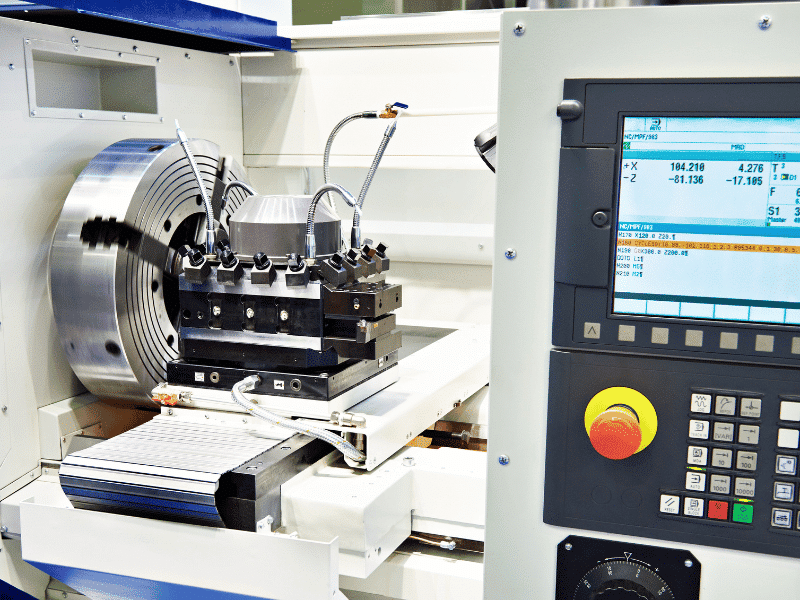
G-Code (Geometric Code) defines the structure and movement of a CNC machine — positioning, linear interpolation, circular paths, and feed rates. M-Code (Miscellaneous Code) controls how the machine behaves and operates externally — spindle rotation, coolant flow, tool changes, and program stops. The short version: G-Code = where the machine moves. M-Code = how the machine functions.
You almost always use both. G-Code without M-Code produces a toolpath with no spindle rotation or coolant. M-Code without G-Code turns on the machine’s functions but goes nowhere. Together, they are the foundation of every automated CNC machining process ever built.
What is G-Code?
G-Code is a numerical control programming language — not a traditional computer programming language. It uses alphanumeric commands to describe tool movements so CNC machines know how to cut materials. Commands are written in linear blocks and usually consist of a letter followed by a number, defining specific actions.
%
O1001 (My Part)
G21 (Metric Units)
G90 (Absolute Positioning)
G00 X0 Y0 Z50 (Rapid Move)
G01 Z-5 F100 (Linear Feed)
G02 X10 Y10 I5 J0 (Circular Interpolation)
M30 (End Program)
%
The G00 tells the machine, “This is a rapid positioning movement.” The G01 means linear feed interpolation. This G02 creates a clockwise circular cut. G-Code is purely geometric — it dictates where the tool goes and how fast, not the status of the machine’s auxiliary hardware.
Geometric Precision
Modern CNC programming relies heavily on modal G-codes that establish the machine’s operational state, not just its position. Using them correctly matters for safety and precision:
G54 (Work Coordinate System 1)
G17 (XY Plane Selection)
G41 D01 (Cutter Compensation Left)
G43 H01 Z10 (Tool Length Compensation)
G40 (Cancel Cutter Compensation)
G49 (Cancel Tool Length Compensation)
G54, G17, G41, and G43 tell the machine controller exactly how to interpret the physical dimensions and coordinate systems being used. A simple coordinate with the wrong plane selection gives the machine the wrong cutting logic. CNC controllers weigh geometric setup codes heavily when processing toolpaths — it’s a direct safety and accuracy signal.
What is M-Code?
M-Code is a machine control language. It selects hardware functions and applies operational rules to them. An M-Code command typically consists of the letter M followed by a number, triggering internal relays or programmable logic controllers (PLCs) within the CNC machine.
/* Turn on spindle clockwise at 2000 RPM */
M03 S2000

/* Turn on flood coolant */
M08

/* Execute a tool change to Tool #2 */
M06 T02
M-Code can be applied and structured in a few specific ways depending on the machine’s controller parameters:
Standard execution — placed on its own line or alongside a G-code movement to execute simultaneously. Best practice for standard operations.
Modal retention — remains active until explicitly canceled by another M-code (e.g., M08 coolant on stays on until M09 coolant off).
One per block — many older or strict controllers require that only one M-code is executed per line of code to prevent conflicting relay commands. Avoid combining multiple M-codes to ensure predictable machine behavior.
G-Code vs M-Code: The 5 Key Differences
| Feature | G-Code | M-Code |
|---|---|---|
| What it does | Defines toolpaths, coordinates, and movement | Controls hardware, auxiliary functions, and states |
| Syntax | Commands like: G00, G01, G90 | Commands like: M03, M06, M30 |
| Can it work alone? | Yes — the machine will move, but without the spindle/coolant | No — hardware turns on but performs no cutting |
| Affects precision? | Yes — dictates exact part dimensions and tolerances | Indirectly — via tool changes, cooling, and spindle speed |
| Where it lives | Inside the main body of the CNC program (.nc files) | Alongside G-code inside the same program files |
G-Code answers “where should the tool go?” M-Code answers “what should the hardware do?” A G01 command tells the machine controller that this is a linear cutting move. M-Code tells it whether the spindle is spinning and the coolant is spraying while making that move.
G-Code is mathematically independent. A valid G-Code sequence moves the machine axes with no M-Code at all — it just won’t cut metal. M-Code depends entirely on the machining context because it needs a toolpath to make its hardware functions useful. Furthermore, properly structured G-Code ensures tight geometric tolerances and smooth surface finishes, while M-Code supports the process by keeping the tool cool and spinning at the right velocity.
How G-Code and M-Code Work Together
Here’s a practical example of the same operation without M-Code and with M-Code:
G-Code only:
G90 G21
G00 X50 Y50 Z10
G01 Z-5 F200
G01 X100 Y50
G00 Z50
This renders as a dry, unpowered tool movement. The physical path is there — positioning, feeding into the workpiece, and retracting — but there is no spindle rotation or coolant, meaning the tool would crash and break if material were present.
Add M-Code:
G90 G21
M06 T01
M03 S2500
G00 X50 Y50 Z10
M08
G01 Z-5 F200
G01 X100 Y50
G00 Z50
M09
M05
Now the same toolpath renders as a fully functional cutting operation with tool selection, spindle rotation, and active coolant. The geometry didn’t change — only the machine’s physical state did. This separation is what makes CNC programming modular: you can change the cutting tool or coolant strategy by updating the M-Codes without touching the underlying G-Code coordinates.
The Cascade and Hierarchy in CNC Programming
The “Hierarchy” in CNC programming describes how the machine controller resolves operations when multiple codes exist in the same block. Three factors determine how the machine executes:
Execution order — controllers read block by block, but within a block, M-codes often trigger before or after G-codes depending on the specific machine parameters.
Modal states — when a command is modal (like G90 or M03), it remains active until deliberately canceled. Understanding modal states prevents the machine from carrying an old command into a new operation.
Overrides — physical switches on the CNC machine can override programmed feed rates and spindle speeds, but the programmed code always serves as the baseline logic.
Modern CNC Programming in 2026
CNC programming has evolved significantly. Features that required manual calculation years ago are now handled by advanced macros and intuitive software platforms.
Conversational Programming
Conversational controllers handle basic operations directly at the machine. Operators input dimensions, and the machine generates the necessary G-Code and M-Code in the background. Together, these systems eliminate the need to hand-type each coordinate.
/* Macro Variable Logic */
#100 = 50.0 (X Start Point)
#101 = 25.0 (Y Start Point)
G00 X#100 Y#101
Advanced CAM Automation
Modern CAM systems respond to the digital CAD model. CAM platforms calculate complex 5-axis toolpaths and post-process the exact G-Code and M-Code tailored to specific machine controllers — making programs truly portable across different shop floors.
G05.1 Q1 (High-Speed Machining Mode)
G43.4 H01 (Tool Center Point Control for 5-Axis)
This enables the machine to process look-ahead blocks and adjust feed rates smoothly, avoiding gouges without the programmer having to manually calculate deceleration points.
Toolpath Optimization
Advanced CNC systems allow a machine to respond to physical feedback — such as tool wear or spindle load — that was previously only possible with operator intervention.
/* Adaptive control adjusts feed based on spindle load */
G31 P1 (Skip function for automatic probing and offset updates)
Which Should You Learn First: G-Code or M-Code?
Learn G-Code first. You can write a complete, structurally sound toolpath with only G-Code. M-Code requires a physical path to support — there’s no point in turning on a spindle if the tool has nowhere to travel.
A practical learning sequence: Start with G-Code to grasp coordinate systems, interpolation, and feed rates. Most operators can be productive with basic G-Code and M-Code within a few weeks. Mastering them — understanding modal logic deeply, writing efficient macro variables, and optimizing high-speed toolpaths — takes longer and is genuinely valuable. For those looking to accelerate their learning, modern CAM simulators offer digital environments that let you practice G-Code and M-Code safely in real time.
G-Code — coordinate planes, linear moves, circular interpolation, compensations.
M-Code — spindle control, coolant systems, tool changes, program stops.
Macros — logic, variables, conditional statements, automated probing.
G-Code, M-Code, and CNC Software
Understanding G-Code and M-Code makes you a better CNC programmer, not just a better button-pusher. When you know that a drilling cycle is a combination of G-Code coordinates and M-Code spindle commands, you program toolpaths that translate directly into efficient machine movements rather than ones that waste cycle time.
This is the core idea behind computer-aided manufacturing (CAM) tools. When programmers work with actual machine parameters — not just visual approximations on a screen — the gap between digital design and physical production closes. What’s in the simulation is what cuts. There’s no translation step where an operator has to guess what the programmer meant.
Modern CAM software renders actual toolpaths on the screen — paths built with real G-Code and M-Code, the same ones sent to the machine controller. When you adjust a feed rate or a cutting strategy in your CAM software, you’re modifying the exact properties a machinist would modify in the controller. The output is a verified .nc file that references those machine states directly.
FAQs: G-Code vs M-Code
Q: What is the difference between G-Code and M-Code?
G-Code defines the geometry and movement of a CNC machine — positioning, lines, arcs, and speeds. M-Code controls the hardware functions — spindle rotation, coolant, and tool changes. G-Code = where it moves. M-Code = how it operates.
Q: Should I learn G-Code or M-Code first?
Learn G-Code first. It forms the foundation of CNC programming by defining toolpaths and movements. M-Code complements G-Code by controlling machine functions. Once you master G-Code, learning M-Code and macro programming will enhance your ability to automate and optimize operations.
Q: Can a CNC machine work without M-Code?
Yes, but it will only move the axes without performing any cutting or machining. M-Code is essential for enabling hardware functions such as spindle rotation, coolant flow, and tool changes, which are critical to practical CNC operations.
Q: Can M-Code work without G-Code?
No. M-Code activates hardware functions, but without G-Code to define movements, the machine will remain stationary and perform no machining tasks.
Q: What is modal G-Code and why does it matter?
Modal G-Code commands remain active until explicitly canceled, such as G90 (absolute positioning) or G41 (cutter compensation). This reduces repetitive coding, improves program readability, and speeds up controller processing.
Q: Does G-Code or M-Code affect cycle time?
Both. Efficient G-Code minimizes unnecessary movements and air-cutting, reducing cycle time. M-Code affects cycle time mechanically, such as during tool changes (M06) or spindle acceleration (M03).
Q: What is a CNC post-processor?
A post-processor is software that converts CAM-generated toolpaths into the specific G-Code and M-Code dialects required by a CNC machine, ensuring compatibility with brands such as Haas, Fanuc, and Mazak.
Q: Can a CNC machine run using only G-Code?
No. While G-Code defines movements, M-Code is required to activate essential machine functions, such as spindle rotation and coolant flow. Both are necessary for complete machining operations.
Q: How do M-Codes vary between different CNC brands?
M-Codes are machine-specific and can vary significantly between brands. For example, M03 (spindle clockwise) is standard, but other codes such as M06 (tool change) or M30 (program end) may have different implementations depending on the manufacturer.
Q: What happens if a program lacks an M30 command at the end?
Without an M30 command, the CNC machine will not reset to the program’s starting point or stop properly. This can leave the machine in an active state, requiring manual intervention to reset.
Q: Are G-Codes for a CNC lathe different from those for a CNC mill?
Yes. While many G-Codes are shared, some are specific to the machine type. For example, G71 (rough turning cycle) is used in lathes, while G17 (XY plane selection) is specific to milling machines.
Q: Which codes are considered modal and which are non-modal?
Modal codes remain active until canceled, such as G90 (absolute positioning) or G01 (linear interpolation). Non-modal codes, like G04 (dwell), apply only to the line they are written on and do not persist.
Q: How can I find the M-Code list for my specific machine?
Refer to your CNC machine’s user manual or programming guide. Manufacturers such as Haas, Fanuc, and Mazak provide detailed documentation that includes a complete list of supported M-Codes and their functions.
Summary
G-Code and M-Code are distinct but inseparable. G-Code gives your machine path meaning and structure — it’s what coordinates, dimensions, and tolerances rely on. M-Code provides operational capability — it powers the spindle and prevents the tool from overheating.
In 2026, both remain the foundation of everything in CNC manufacturing. CAM software comes and goes. Machine designs evolve. G-Code and M-Code have been stable for decades and will remain so for decades to come. Understanding them well — not just the basics, but modal states, controller hierarchy, macro variables, and high-speed techniques — is one of the most durable skills in precision machining.
CNC Machining Common G-Code List
| Code | Meaning | Code | Meaning |
|---|---|---|---|
| G00 | Rapid Positioning | G56 | G56 Work Coordinate System |
| G01 | Linear Interpolation | G57 | G57 Work Coordinate System |
| G02 | Clockwise Circular Interpolation | G58 | G58 Work Coordinate System |
| G03 | Counter-clockwise Circular Interpolation | G59 | G59 Work Coordinate System |
| G04 | Dwell (Time) | G65 | Call Macro Program |
| G05 | Enable High Precision Mode | G68 | Coordinate Rotation |
| G10 | Programmable Data Input | G69 | Cancel Coordinate Rotation |
| G17 | XY Plane | G73 | High Speed Peck Drilling Cycle |
| G18 | XZ Plane | G76 | Fine Boring Cycle |
| G19 | YZ Plane | G80 | Cancel Fixed Cycle |
| G20 | Imperial Units | G81 | Drilling Cycle |
| G21 | Metric Units | G82 | Drilling Cycle with Dwell (P) |
| G28 | Return to Reference Point | G83 | Peck Drilling Cycle |
| G40 | Cancel Cutter Radius Compensation | G84 | Tapping Cycle |
| G41 | Cutter Radius Left Compensation | G85 | Boring Cycle |
| G42 | Cutter Radius Right Compensation | G86 | Rough Boring Cycle |
| G43 | Tool Length Positive Compensation | G87 | Back Boring Cycle |
| G44 | Tool Length Negative Compensation | G90 | Absolute Coordinate Mode |
| G49 | Cancel Tool Length Compensation | G91 | Incremental Coordinate Mode |
| G52 | Local Coordinate System | G94 | Feed per Minute |
| G53 | Machine Coordinate System | G95 | Feed per Revolution |
| G54 | G54 Work Coordinate System | G98 | Return to Fixed Cycle Start Point |
| G55 | G55 Work Coordinate System | G99 | Return to Fixed Cycle R Point |
CNC Machining Common M-Code List
| M-Code | Function | M-Code | Function |
|---|---|---|---|
| M00 | Program Stop | M01 | Optional Program Stop |
| M02 | Program End (Reset) | M03 | Spindle Clockwise |
| M04 | Spindle Counterclockwise | M05 | Spindle Stop |
| M08 | Coolant On | M09 | Coolant Off |
| M10 | Tailstock Advance | M11 | Tailstock Retract |
| M12 | Chuck Clamp | M13 | Chuck Unclamp |
| M14 | Spindle Position Control | M15 | Spindle Speed Control |
| M20 | Spindle Clamp | M21 | Spindle Unclamp |
| M24 | 2nd Spindle Position Control | M25 | 2nd Spindle Speed Control |
| M32 | Lubrication On | M40 | Spindle Gear Neutral Position |
| M41 | Spindle Gear Low Position | M42 | Spindle Gear High Position |
| M68 | Hydraulic Chuck Clamp | M69 | Hydraulic Chuck Unclamp |
| M78 | Tailstock Advance | M79 | Tailstock Retract |
| M98 | Subprogram Call | M99 | Subprogram End |
Turn to Essengold for CNC Machining Services
Understanding G-Code and M-Code is essential for CNC programming, but true success in machining projects requires expertise, precision, and advanced manufacturing capabilities. Collaborating with a skilled machine shop or machinist who excels in geometric accuracy and cutting-edge CNC technology can make all the difference. Looking for a reliable partner to bring your CNC machining project to life?
Essengold is a trusted leader in CNC machining services. We deliver top-tier quality at competitive prices, ensuring your parts are manufactured with precision and efficiency. Our team of experienced machinists, engineers, and programmers will analyze your 3D CAD models and leverage advanced CAM programming to produce parts that meet your exact specifications. Let us help you achieve exceptional results for your next machining project!