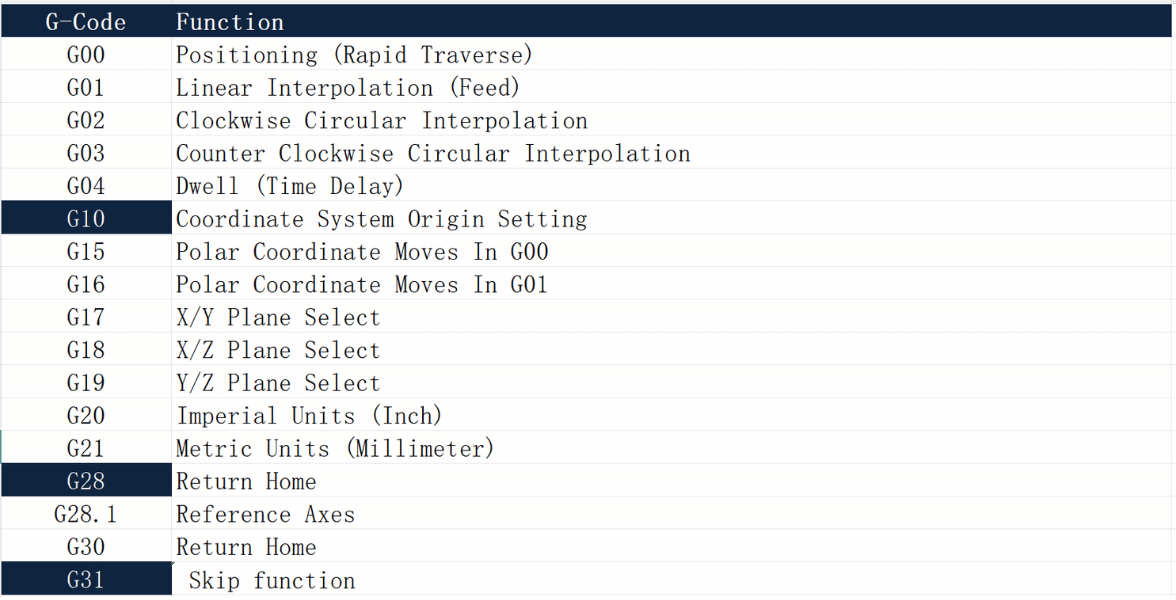
Three G-codes carry an outsized share of the workload on any CNC machine. G10 writes your offsets and work datums directly into the program. G28 returns the axes to a known reference point. G31 lets the machine probe a surface and stop the moment it makes contact. Learn how these three work, and you gain real control over setup speed, safety, and accuracy.
This guide gives you the full picture. We’ll cover what each code does, how the three differ, and how they combine into one clean setup workflow. From here, you can dive deeper into dedicated guides for each code, complete with syntax, program examples, and the mistakes that catch even seasoned operators off guard.
Why These Three Codes Matter Together
Most G-codes handle a single, narrow job. These three are different. They touch the parts of machining that decide whether a job runs smoothly or ends in scrapped parts and a crashed spindle: where the part sits, how the machine moves to safe positions, and how you measure real surfaces.
G10, G28, and G31 each solve a separate problem. But when strung together, they form the backbone of a controlled, repeatable setup — the kind that protects your tooling, parts, and cycle time. Understanding all three gives a programmer or manufacturing engineer a reliable framework for setting datums, moving safely, and measuring with confidence.
Quick Comparison: G10 vs G28 vs G31
Here’s how the three codes line up at a glance:
| Code | Function | Primary Use | Key Benefit |
|---|---|---|---|
| G10 | Programmable data input | Set work offsets and tool offsets inside the program | Removes manual entry errors |
| G28 | Automatic return to reference point | Send axes home safely for tool changes or part removal | Predictable, controlled motion |
| G31 | Skip function | Probe a surface and stop motion on contact | Enables automated measurement |
Each code answers a different question. Where is the part’s datum? How do I move home safely? Where does the real surface actually sit? The sections below provide a working summary of each and show how they connect.
G10: Programmable Offsets and Work Datums
G10 lets you set offset values straight from the program, instead of typing them into the control by hand. You can write a work coordinate system like G54, or load tool length and wear offsets, directly into your G-code.
This matters for one simple reason: manual entry invites mistakes. With G10, your offsets travel with the program file. Load the job, and the datums are already defined — no operator guesswork, no off-by-one errors at the control panel.
A basic Fanuc-style work offset looks like this:
G90 G10 L2 P1 X-300.0 Y-220.0 Z-450.0
Here L2 flags a work coordinate offset, P1 selects G54, and the X, Y, Z values set the datum from machine zero. G10 is the go-to code for repeatable fixtures, multiple parts on one table, and lights-out batch jobs where you want the operator entirely out of the offset-entry loop.
Want the full breakdown? Our dedicated guide covers G10 syntax, L-code maps, tool offset examples, and the Fanuc vs Haas differences in detail: G10 CNC Code Explained: How to Set Offsets and Datums →
G28: Automatic Reference Return
G28 sends the machine axes back to the reference point — usually machine home. You reach for it before a tool change, before pulling a part off the table, or any time you need the axes in a known, safe position.
The detail most beginners miss is the intermediate point. G28 doesn’t travel straight home. It first moves through an intermediate position, then continues to the reference point. That intermediate point gives you control over the path the tool takes, which is exactly how you avoid dragging a cutter across your workpiece.
The safest and most common form looks like this:
G91 G28 Z0
Working in incremental mode (G91) with Z0 keeps the intermediate point at the current position, so the tool simply lifts to home with no surprise moves. Retract Z first, then send X and Y home, and you protect both the part and the fixture every time.
Get the safe-return workflow in full — including the G90 vs G91 trap and when to use G53 instead — in our focused guide: G28 CNC Code Explained: Return to Machine Home Safely →
G31: The Skip Function and Probing
G31 is a feed move that stops the instant a probe signal fires. The machine feeds along a path, and when the probe touches a surface, motion halts and the control records the exact position of contact. That captured position is the foundation of on-machine probing.
With G31, you can measure part surfaces, find edges, and set datums based on the actual part rather than an assumption about where the fixture holds it. A simple probing move looks like this:
G31 Z-50.0 F50.0
The probe feeds toward Z-50.0 at a slow, controlled feed rate. The moment it trips, the move ends — even if the axis never reaches the target — and the contact position lands in a system variable (on Fanuc, often #5063 for Z). Keep the feed rate slow, always program a retract after contact, and plan for missed-contact overtravel.
Probing has real depth to it. Our dedicated guide walks through skip-function variables, in-process inspection, and Haas probing macros: G31 CNC Code Explained: How the Skip Function and Probing Work →
How G10, G28, and G31 Work Together
The real payoff comes when you combine all three into one workflow. Picture a typical setup: you want to probe the actual top surface of a part, write that measured value into your G54 datum, then retract safely.
The sequence flows like this:
- G28 parks the Z axis at home, so the routine starts from a known, safe position.
- G31 feeds the probe down and stops on contact, capturing the real surface height in a system variable.
- G10 writes that measured value straight into the G54 work datum — no manual entry, no rounding.
- G28 retracts the axis home cleanly when the routine finishes.
Return home, probe the part, set the datum, return home. This loop removes guesswork from setup. The datum reflects the real part, the motion path stays safe, and the offset is written automatically. That’s the practical reward for knowing all three codes well — and it’s why they belong together in any serious programmer’s toolkit.
Key Takeaways
- G10 writes offsets and datums into your program, reducing manual-entry errors and making setups repeatable.
- G28 moves axes to the reference point through a controlled intermediate position — always mind G90 vs G91.
- G31 stops motion on probe contact and stores the position, enabling automated measurement and datum setting.
- Used together, the three support a clean, accurate, low-risk setup workflow that protects your parts, your probe, and your cycle time.
Small differences between Fanuc and Haas controls matter, so always confirm syntax against your machine’s manual before running a new routine. A few minutes of checking beats a crashed spindle. When you’re ready to go deeper, follow the links above into each dedicated guide.
Need Precision CNC Machining You Can Trust?
Understanding G-code is one thing. Turning it into accurate, repeatable parts is another. At Essengold, we pair deep programming expertise with tight process control to deliver components that meet your specs every time. From rapid prototypes to full production runs, our team manages the offsets, datums, and probing routines so you don’t have to.
Get a quote on your CNC machining project today → and see how precise, reliable manufacturing keeps your project moving forward.